


A hands-on review by Andrei Ciomîrtan (refu.ro/en/) on version v0.8.45
I’ve been messing around with computers since 1996 and building websites since I was 11, so by now I’ve seen a few “revolutions” come and go. I lived through the WordPress boom, I’ve patched more PHP-Fusion installs than I care to admit, and in the last two years I’ve thrown myself headfirst into the AI vibe-coding wave — Bolt, Lovable, v0, and a bunch of smaller tools I test for my agency clients at Digital Inbound.
So when I heard about Friday Code from tryfriday.ai, I was curious but also a little skeptical. Another “describe your app and watch it build itself” tool? I’ve tested enough of those to know that most of them are great for a landing page and fall apart the moment you ask for something with real logic behind it.

I downloaded the macOS build on my MacBook (M-series, 16GB RAM, nothing exotic) and spent about two weeks actually building things with it — not just poking at the demo prompt on the homepage, but trying to replicate a small internal tool I actually needed for one of my SEO clients. Here’s what I found.
First impressions on macOS
The install itself is painless — it’s a native desktop app, not a browser tab pretending to be an app, which honestly matters more than people admit. After years of running Bolt and Lovable through Chrome tabs that eat half my RAM, having Friday Code sit in the dock like a real application felt like a small luxury. It opens fast, the interface is clean, and it doesn’t try to overwhelm you with fifty settings before you’ve even typed your first prompt.
The onboarding nudges you toward a sample prompt (something like building a SaaS landing page with a pricing calculator and a waitlist form), and within a minute or two you see it scaffolding files, writing components, and previewing the result live. It’s satisfying to watch, in the same way it was satisfying the first time I saw Lovable do it — except here I got the sense pretty quickly that this thing wants to be more than a landing-page generator. Check Lovable vs. Friday Code.
Building something real, not just a demo
I didn’t want to review the shiny homepage prompt everyone uses. So I asked it to build a simple client-facing dashboard where I could track SEO reporting status for a handful of accounts — think a mini CRM with a Supabase-backed database, login, and a table view with filters. This is exactly the kind of project that separates “toy AI builder” from “actual coding agent.”
Friday Code handled the database setup by connecting directly to Supabase through its integrations, created the auth flow, and built out the table UI without me having to explain what a foreign key was. When I asked it to “add a status column and let me filter by client,” it didn’t just bolt on a UI element — it actually touched the schema and the queries behind it. That’s the part that impressed me. A lot of these tools are convincing at the surface level (nice UI, smooth animations) but fall over the moment the request touches actual backend logic. This one didn’t, at least not in my two weeks of testing.
What actually stood out to me
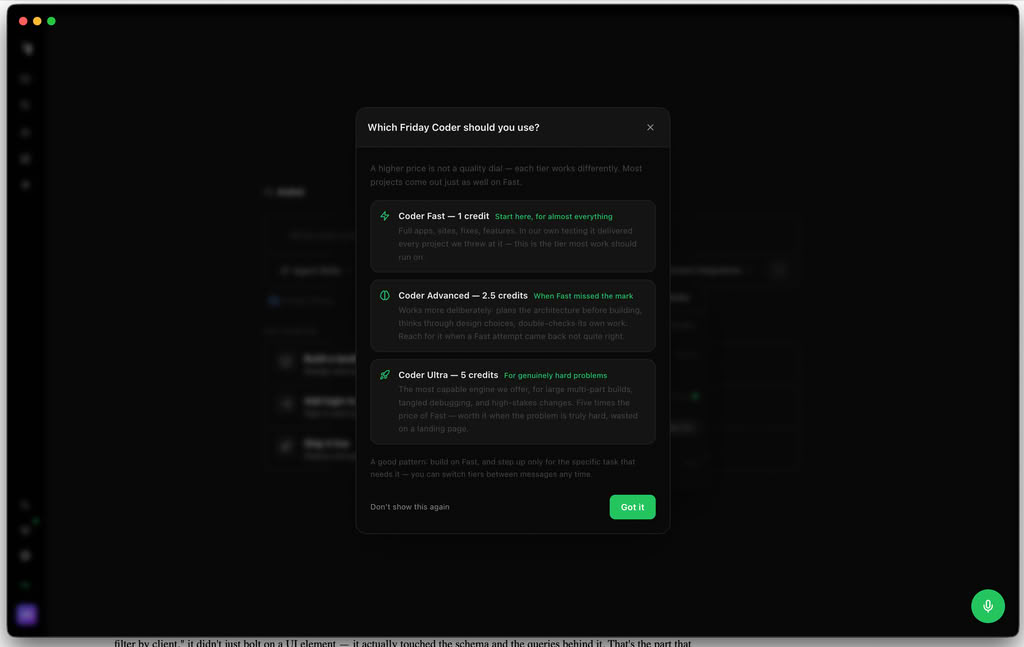
1. Picking the right “agent” for the job. Instead of one generic AI trying to do everything, Friday Code lets you switch between Friday Go, Friday Coder, and Friday Writer right inside the same chat. Go is for quick edits and small fixes, Coder is the one you want for multi-file, full-stack work, and Writer is oddly good for things like writing the copy for your landing page or drafting documentation once the app is built. Once I understood this split, my results got noticeably better. I stopped throwing everything at one model and started matching the task to the right agent, and the output quality jumped.
2. Screen sharing / vision. This one genuinely surprised me. You can share your screen (or a specific window) and have Friday look at what’s on it — a competitor’s site you want cloned, a UI bug you’re struggling to describe in words, or a Figma mockup. I shared a screenshot of a client’s outdated Elementor page and asked it to “make something like this but modern,” and it actually picked up on layout cues instead of me having to type out a paragraph describing spacing and colors. For someone who’s spent 15+ years staring at broken CSS, this felt like finally being understood.
3. Real deployment, not a toy sandbox. It hooks into Vercel and GitHub for actual CI/CD, so what you build isn’t trapped in some proprietary preview window. You can export code, push to your own repo, and deploy for real. As someone who’s had to migrate clients off of “no-code” platforms that trap you forever, this was the single biggest trust-builder for me.
4. It respects the work you’ve already done. You can import existing projects from Lovable, Replit, GitHub repos, or even folders you were working on in Cursor or Claude Code, and keep building from there instead of starting from zero. I tested this with an old Lovable export and it picked up the context without me having to re-explain the entire app.
5. Scheduled automations. You can set agents to run on a recurring basis — generating SEO blog drafts, triaging bugs, sending digest emails — while you’re doing literally anything else. I set one up to draft weekly content ideas for a client’s blog, and it’s been quietly doing its job in the background for about ten days now without me babysitting it.
The two things that bugged me

Nothing is perfect, and I’d be lying to you (and to my own readers, who know I don’t do fluff reviews) if I said this was flawless.
The credit system runs out faster than you’d expect on complex builds. The Pro plan gives you 100 credits a month for $20, which sounds generous until you’re deep into a full-stack build with a database, auth, and a dozen back-and-forth refinements. Coder-tier tasks and premium models eat through credits noticeably faster than the quick Go edits, so if you’re building something serious rather than tinkering, budget for the Max tier ($100/month) or watch your usage closely. It’s not a dealbreaker, but it caught me off guard mid-project once, and there’s nothing more annoying than momentum getting interrupted because you’re staring at a “low credits” warning.
The learning curve on agent selection is real, even if it’s small. The three-agent system (Go/Coder/Writer) is powerful once you get it, but the app doesn’t do a great job explaining upfront which one you should reach for. I wasted a good hour early on using Go for a task that clearly needed Coder, and got mediocre results before I figured out the split myself. A short in-app tutorial or a smarter auto-routing suggestion would fix this instantly.
So, is it worth it?

For a guy who’s spent almost three decades bouncing between HTML tables, WordPress themes, and now AI agents that write full backends, Friday Code is one of the few tools in this category that felt like it respected my time rather than just impressing me for five minutes. It’s not a toy. The Supabase/Vercel/GitHub integrations are real, the screen-sharing feature is a genuinely useful idea I haven’t seen executed this well elsewhere, and the ability to import projects from tools you already use (Lovable, Replit, Cursor) means you’re not locked into starting over.
Is it perfect? No — the credit economics need to be clearer, and the agent-switching logic needs better onboarding. But as someone who tests AI coding tools for a living at this point, I’d put Friday Code near the top of the pile for anyone on macOS who wants to go from “I have an idea” to “I have a working app with a real database” without hiring a developer.
My verdict: 8.5/10. Strong enough to replace a chunk of my Lovable/Bolt workflow, not quite polished enough to fully retire them yet.
If you want to try it yourself, it’s free to get started on both macOS and Windows — worth the download just to see the screen-sharing feature in action.